QA Scoring & Rubrics
Score every call against your own quality checklist.
A QA score is only as good as the checklist behind it. Astervis lets you define that checklist yourself — your greeting, your compliance line, your closing — and then scores every analysed call against it, with reasons and quotes you can trust. No spreadsheets, no listening to calls one at a time.
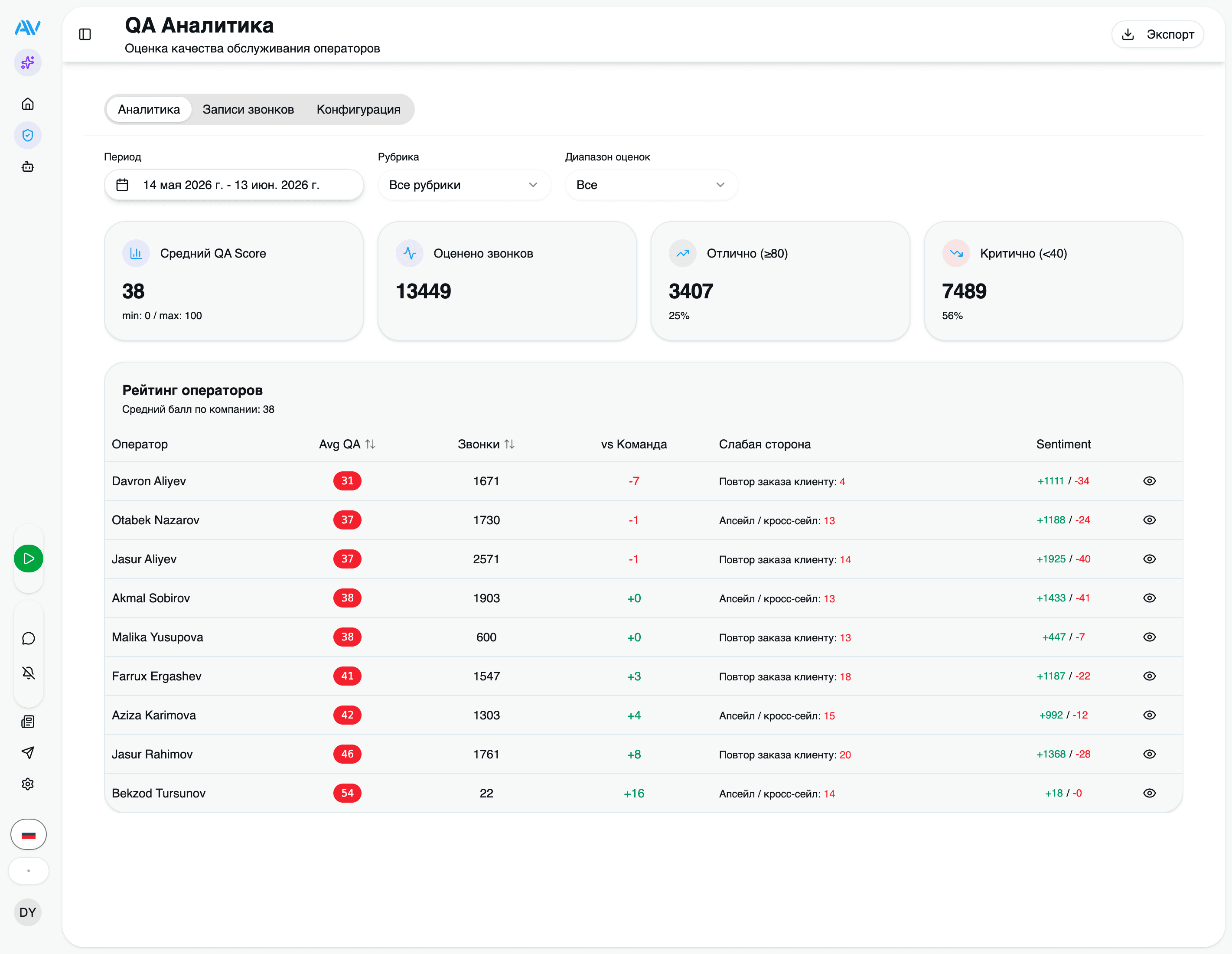
Each call still gets the overall 0–100 score you see on the call card, but a rubric is what gives that number meaning. A rubric is a set of weighted criteria you control, and you can run a different one for sales than for support.
QA scoring rides on the AI analysis pipeline. If AI is enabled on your plan, scoring is already running on new calls — there's nothing extra to deploy. This page is about shaping what gets scored.
The rubric model
A rubric is a list of criteria. Every criterion has a weight, and the weights must add up to exactly 100 — that way the weighted average is a clean percentage. If your "Greeting" criterion is worth 10 and your "Closing" is worth 15, a perfect greeting plus a perfect close contributes 25 points to the call's overall score.
Each criterion is one of four kinds, and choosing the right kind is the most important decision you make when designing a rubric:
rating
The model scores 0–100 with written reasoning and supporting quotes. Use for judgement calls like empathy, discovery quality, or objection handling.
yes_no
The model answers strictly 0 or 100 — did it happen or not. Use for binary checks like 'agent stated their name'.
phrase_check
A deterministic regular expression run on the transcript. No LLM involved, so it's free and exact. Use for required script lines.
fail_gate
The model scores 0–100, but if it falls below a threshold the WHOLE call fails. Use for compliance you cannot bend on.
A few notes that matter in practice:
ratingis the workhorse. Alongside the score it returns a short reasoning and 2–5 quotes from the call, so a supervisor can see why the agent lost points without opening the recording.phrase_checkis resolved locally on your server with a regex — it never goes to the model. That makes it both deterministic (the same transcript always scores the same) and zero-cost. It's the right tool for "the agent must say the legally required opener verbatim."fail_gatedoesn't just lose points — it can fail the entire call. We cover a full example in Fail-gate compliance below.
Every criterion also carries a multilingual name and description (ru / en / uz), an optional set of good-behaviour examples that act as few-shot guidance for the model, a pass threshold, and a stable internal id. The id is what lets us track the same criterion's score over time even after you rename it or reword its description — so editing a rubric never breaks your historical trends.
Skip conditions
You rarely want to score every call. A 4-second misdial or a quick internal transfer shouldn't drag down an operator's average. Each rubric has a set of skip conditions that decide which calls it applies to:
| Condition | What it does |
|---|---|
| Minimum duration | Skip calls shorter than N seconds — filters out misdials and hang-ups. |
| Direction | Restrict to incoming, outgoing, or after_hours calls only. |
| Queues | Apply only to specific queue IDs — e.g. score the sales queue with a sales rubric. |
A call that matches a skip condition is left unscored by that rubric rather than scored poorly. Direction and queue filters are also how you run different rubrics for different teams: a sales rubric scoped to the outbound sales queues, a support rubric scoped to inbound — without either touching the other's calls.
Start from a template
You don't have to build a rubric from a blank page. Astervis ships 8 built-in industry templates, each professionally weighted to total 100 and translated into Russian, English, and Uzbek. Clone the closest one, then tune it.
| Template | Designed around |
|---|---|
| Outbound Sales | Rapport, discovery, pitch, objection handling, closing — with a no-pressure fail-gate. |
| Inbound Support | Greeting, empathy, problem comprehension, resolution, closing — with a politeness fail-gate. |
| Restaurant / Food Delivery | Brand greeting, menu recommendation, upsell, order read-back, address verify, delivery ETA. |
| Medical Reception | Clinic greeting, symptom intake, specialist routing, captured name/DOB/phone — with no-diagnosis and confidentiality fail-gates. |
| Tech Support | Diagnostic questions, step-by-step guidance, plain language, escalation logic, ticket summary. |
| Banking | Identity verification (fail-gate), product accuracy, compliance disclosures, active listening — with a data-safety fail-gate. |
| Telesales | Script-intro phrase-check, permission to continue, 30-second value prop, qualifying, disposition — with respectful-tone and DNC fail-gates. |
| Generic | A safe default: greeting, active listening, competence, resolution, closing, politeness. |
Manage rubrics from the visual editor at /qa-analytics/rubrics.
Open the rubric editor
Go to /qa-analytics/rubrics. You'll see your active rubrics and the template
gallery.
Clone a template
Pick the industry template closest to your work and clone it. The copy is yours to edit — the original template stays untouched.
Tune the criteria
Add, remove, or reweight criteria; change a criterion's kind; edit the names and descriptions in any of the three languages. The editor keeps the weights honest — it won't let you save until they total 100.
Set skip conditions
Decide the minimum duration, direction, and queues this rubric applies to.
Save and activate
Make it the default rubric and new calls start scoring against it on the next analysis job.
Templates are starting points, not rules. Banking teams routinely drop a criterion that doesn't fit their script and add their own phrase-check for a brand line — that's exactly what the editor is for.
How scoring runs
Here's the part that keeps it cheap: the default rubric is sent with every analysis job. The same single multimodal Gemini call that does transcription and diarization also evaluates your rubric criteria — so QA scoring costs roughly half of what a separate second request would.
When the result comes back, your server does a little assembly:
phrase_checkcriteria are resolved locally with a regex against the transcript — no model involvement at all.rating,yes_no, andfail_gatecriteria use the model's per-criterion judgement.- The weighted overall score is recomputed on your server from all of the above, so the final number always reflects your exact weights.
Each call's per-criterion breakdown lands in qa_details on the ai_transcripts
row, as an array of objects:
[
  {
    "criterion": "greeting",
    "score": 100,
    "reasoning": "Agent greeted the caller by brand name within the first sentence.",
    "quotes": ["Спасибо за звонок в Astervis, меня зовут Дильноза"]
  },
  {
    "criterion": "identity_verification",
    "score": 40,
    "reasoning": "Agent asked for the account number but never confirmed date of birth.",
    "quotes": ["Назовите номер счёта, пожалуйста"]
  }
]
That qa_details array is the source of truth behind everything on the analytics
dashboard. Protocol breaches the model spots — a missed greeting, rude language, wrong
information — are also recorded as QA violations with a severity of info,
warning, or critical.
The QA Analytics dashboard
Everything above rolls up into the supervisor view at /qa-analytics. It's built
to answer one question fast: who needs coaching, and on what?
Summary & distribution
The top of the page shows the team's average QA score and a distribution histogram — so you can see at a glance whether you have a few outliers or a broad problem.
Per-operator table
Below that, a table of operators with each one's average score and per-criterion averages. This is the column that tells you an operator is fine on greeting and closing but consistently weak on objection handling.
Operator drill-down
Click an operator to open their detail view: the list of their analysed calls (each with its summary and score) and a QA-score-over-time trend so you can tell whether last week's coaching actually moved the needle.
Anomaly detection
You don't have to go looking for problems — the dashboard surfaces them. Astervis auto-detects anomalies and flags them by severity:
Warning — an operator's average QA score has dropped below 60, a QA trend is sliding, or complaints are spiking. Worth a look this week.
Critical — an operator's average QA score is below 40. This is a coaching conversation that shouldn't wait.
The same thresholds power the Operator Coach insight, which builds a daily coaching card per operator. See Agents & insights for how those land in your inbox and reach you over Telegram.
Rescoring historical calls
When you change a rubric, you usually want to know how it would have judged your past calls — not just future ones. The rescore tool re-applies your current default rubric to historical transcripts and recomputes their QA details.
Because qa_details records each criterion by its stable id, rescoring slots cleanly
into your existing trends rather than creating a parallel history.
Rescoring is an operational task run on the server. It re-analyses QA against the new rubric using transcripts you already have, so it doesn't re-send audio to the model. Ask your administrator (or our team) to run it after a significant rubric change — for example, when a banking customer first adopted a sales rubric and rescored hundreds of past calls to get a fair baseline.
A fail-gate compliance example
The clearest way to understand a fail-gate is a banking scenario. Suppose your policy is simple and non-negotiable: an agent must verify the caller's identity before discussing the account. A criterion that merely deducts points for skipping verification is the wrong tool — a call that violated policy could still score 85 and look fine on the board.
A fail_gate criterion fixes that. You set it to score the identity-verification step
0–100, with a high threshold (in the Banking template it must reach 100). If the
model scores it below the threshold, the entire call fails regardless of how good the
rest of it was.
The built-in templates already wire up sensible fail-gates — Banking guards identity and data safety, Telesales guards tone and DNC, Medical guards confidentiality — so cloning the right template gives you compliance coverage on day one.
Next steps
Last updated on