Transcription & Analysis
What the model returns for every analysed call.
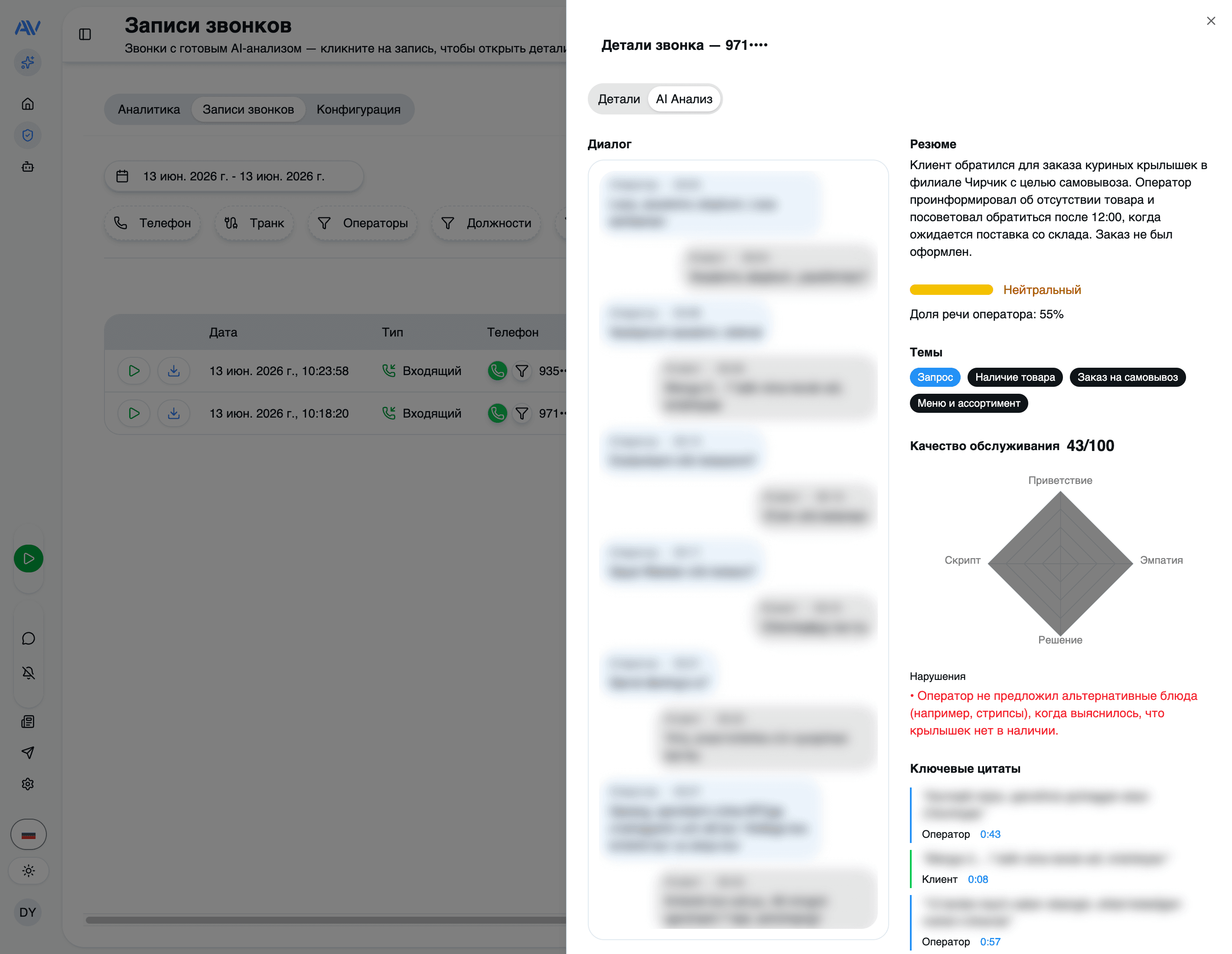
Every recorded call can become a structured record: a full transcript, a short summary, a sentiment, a category, the topics that came up, the most important quotes, and a list of what to do next. This page walks through exactly what Astervis produces for each call, how it gets there, and where you read it.
Analysis only runs on calls that have a recording. If your PBX isn't recording a particular queue or trunk, those calls still appear in your analytics — they just won't have a transcript. AI is also optional and metered; see AI & Privacy for what leaves your server.
How a call gets analysed
There's nothing to schedule and no button to press. When a call ends and its recording lands on the server, the on-prem queue picks it up and submits the audio to the AI gateway as a background job. A single multimodal Gemini call (running on Google Vertex AI) does transcription, speaker separation, and the full analysis together — one request, not a pipeline of separate ones. The result comes back over a webhook and is written to the call.
A recording lands
Astervis already replicates every call record. The moment a recording for a
finished call is available, the call becomes eligible for analysis and a job
is queued. The call's analysis status is pending.
The audio is analysed
The queue sends the recording to Gemini and the status moves to processing.
One multimodal call transcribes the audio, separates the speakers, and runs
the analysis (plus rubric QA, if you use it). Rate-limited jobs back off and
retry on their own without burning their attempt count.
Results are written back
When the gateway returns, the status becomes completed and every output
below is saved to the call. If something goes wrong that can't be retried,
the status is failed instead.
The status lifecycle is therefore pending → processing → completed / failed.
You'll see it on the call detail view, so it's always clear whether a call is
still being worked on or is ready to read.
Diarization: who said what, and when
Astervis records the two sides of a call on separate stereo channels — operator on one channel, customer on the other. That separation is what makes the transcript reliable: instead of guessing who spoke from the audio alone, the model maps each channel to a role, then breaks the conversation into ordered turns.
Each turn is a single utterance and carries everything you need to navigate the call:
- Speaker role —
agent,customer, orunknown. - Text — the verbatim words for that turn, in the language they were spoken.
- Timing —
start_msandend_ms, so a turn lines up with the audio and you can jump straight to that moment in the recording. - Language — detected per turn, because real calls switch languages mid-sentence (Russian and Uzbek often mix in the same call).
Because every turn is timestamped, the transcript on the call card reads like a chat log you can click through, and the per-turn timing is what powers the "jump to this point in the recording" behaviour.
What you get for every call
Beyond the diarized transcript, the model returns a structured analysis. This is the full per-call output:
| Output | What it is |
|---|---|
| Transcript | The complete conversation, diarized into turns, with the original language preserved. |
| Summary | A 2–3 sentence recap — who called, about what, and the outcome. Always written in Russian, regardless of the call's language. |
| Sentiment | The overall tone of the call: positive, neutral, or negative. |
| Category | What kind of call it was: sales, support, complaint, inquiry, followup, or other. |
| Topics | The subjects that came up, each with a 0–1 confidence score. Topic names are normalised to Russian for consistent reporting. |
| Key quotes | 2–5 of the most important verbatim lines, each labelled with who said it. |
| Recommended next actions | Concrete follow-ups (e.g. "send the quote", "call back tomorrow"), each with an optional assignee and priority. |
| Detected language | The primary language of the call. |
| Metrics | Objective numbers like call duration and agent talk ratio (how much of the call the operator was speaking). |
Summaries and topic names come back in Russian by design — it keeps reports and dashboards readable for a Russian-speaking supervisor even when the underlying call was in Uzbek or English. The transcript itself, and every key quote, stays in the original language so nothing is lost in translation.
If you also run QA scoring, the same analysis call returns a 0–100 score against your rubric, along with any protocol violations — at no extra cost, because it rides the same multimodal request. That's covered in detail on the QA scoring page.
Supported languages
Russian, Uzbek, and English are first-class: the analysis prompts are written in all three, so transcription, summaries, and scoring are tuned for them rather than translated.
The model also recognises and handles a wider set downstream — Kazakh, Kyrgyz, Turkish, Arabic, Tajik, and Persian — which matters for the mixed-language calls that are common across the region. A single call can move between languages and the per-turn detection keeps up.
Where to see the results
Everything above shows up on the call detail view. Open any analysed call from your call list and you'll find the transcript, summary, sentiment, category, topics, quotes, next actions, and QA score together on one screen — and the same data feeds the analytics dashboards behind the scenes.
Already have months of recordings from before AI was enabled? You don't have to leave them un-analysed. Historical calls can be rescored against your current rubric in one operation — see QA scoring for how the rescore works.
Last updated on