AI Assistant & Semantic Search
Ask your call data questions in plain language — no reports to build.
Most analytics tools make you find the right dashboard, pick the right filters, and hope the answer is in there somewhere. The Astervis assistant flips that around: you type a question the way you'd ask a colleague — "How many calls did we miss yesterday?" — and it answers, with a number, a short explanation, and a chart it picks for you. Underneath, it can also search across what was actually said on your calls, not just the numbers about them.
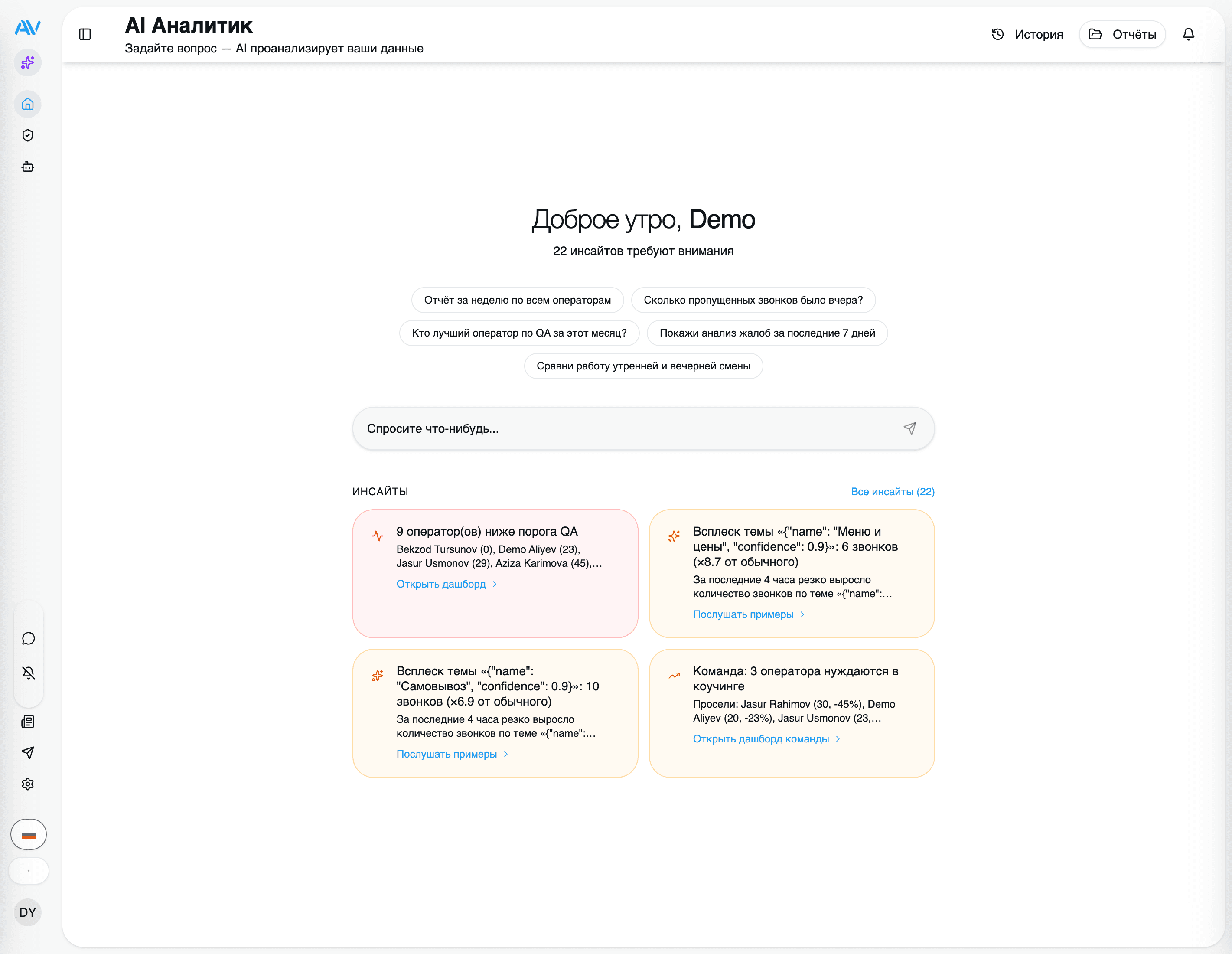
This page explains what the assistant can do, how it stays safe with your data, and the kinds of questions worth trying first.
The assistant is part of the optional AI tier. It runs on the same call data you're already collecting, and like the rest of the AI pipeline it only sends text to Google Gemini for the language work — your call data and recordings stay on your server. See AI & Privacy for exactly what leaves the box.
Two ways to ask
The assistant answers from two different sources, and it chooses between them (or combines them) based on your question:
The numbers
Counts, averages, trends and comparisons over your call records — answered by a generated, read-only SQL query against your analytics database.
The conversations
What people actually said — answered by semantic search over your call transcripts, so you can find calls by meaning, not just keywords.
Semantic search: find calls by meaning
Keyword search finds the word you typed. Semantic search finds the idea — even when the caller used completely different words. Ask for "customers frustrated about delivery times" and you'll get calls where someone said "my order is late again" or "when is this finally arriving", with no shared keyword between them.
This works because every transcript is turned into a searchable index as part of analysis:
- After a call is transcribed and diarized, each transcript is embedded with
Google's
gemini-embedding-001model into 1536-dimension vectors, stored in pgvector right inside your TimescaleDB. - Transcripts are chunked small-to-big: small child chunks (a few turns each) are what gets matched, while a larger parent segment is returned alongside the match so you get the surrounding context, not a stray sentence.
- Retrieval is hybrid — it blends dense vector similarity (meaning) with keyword (BM25) lexical search (exact terms like a product name or order number) and fuses the two rankings. You get the best of both: a search that understands intent but still nails the literal match when it matters.
The practical payoff: you can ask things like "find calls where someone mentioned a refund" and the assistant surfaces the relevant conversations with a quote and a link straight to each call.
The assistant flow, step by step
When you ask a question, the assistant works through a short, predictable pipeline — and it streams the result back live, so you watch it think rather than staring at a spinner.
It understands the question
Your message is classified by intent and rewritten into a clean query. This is where the assistant decides whether your question is about numbers, about what was said, or both.
It writes a read-only query
For anything quantitative, the assistant generates a PostgreSQL SELECT
from your natural language (NL→SQL). Every generated query is run through a
validator that blocks writes and unsafe SQL before it touches the
database — so a question can never change or delete your data.
It searches the transcripts (when useful)
If the question is about content, it runs the hybrid semantic search over your transcripts and re-ranks the best matches, pulling in the parent context for each one.
It answers, with a chart
You get a plain-language summary of what it found, plus an auto-suggested chart — the assistant picks a sensible type, axes and title for the data it just pulled. The whole response streams live as it's produced.
Behind the scenes the assistant picks one of three strategies for each question — query the numbers only, search the transcripts only, or query the numbers and then re-rank with transcript search — so a simple count stays fast and a "why" question gets the depth it needs.
Conversations, history and shareable dashboards
The assistant is a place you come back to, not a one-shot box.
- Conversations persist. Follow-up questions keep their context, so you can drill in — "now break that down by operator" — without restating everything.
- Query history is kept. Every question you've asked is saved, so you (or a teammate) can re-run a useful one later instead of rebuilding it.
- Generative dashboards can be saved and shared. When a question produces a chart worth keeping, save it as a dashboard and share it with a link — handy for a recurring number a supervisor or owner wants to glance at without logging into the analytics screens themselves.
Questions worth trying
Start with the kind of thing you'd otherwise build a report for. A few examples:
- How many calls did we miss yesterday?
- Which operator had the highest average QA score this week?
- Show me call volume by hour for the last 7 days.
- Compare incoming vs outgoing calls this month against last month.
- What's our average wait time, and is it trending up?
You don't have to phrase these precisely — the assistant rewrites and clarifies your question before it does anything, and you can always correct it in a follow-up.
The generated SQL is always read-only and validated. The assistant only
ever produces a SELECT, and every query passes through a validator that
rejects writes (INSERT, UPDATE, DELETE, DROP, and the like) and unsafe
SQL before it runs. Asking a question can read your data — it can never change
it.
Where it fits
The assistant sits on top of everything else the AI pipeline produces, so the richer your transcripts and QA data, the more it can answer.
Transcription & analysis
The transcripts and metadata the assistant searches and reasons over.
QA scoring & rubrics
The scores behind questions like 'who scored highest this week'.
Agents & insights
Let Astervis ask the questions for you, on a schedule.
AI & privacy
What stays on your server, and what doesn't.
Last updated on