Calls & Transcripts
Browse calls and open the full AI analysis of each one.
Every call your PBX handles shows up here. The calls table is your window into the replicated Call Detail Records (CDR), and each row opens a detail view with the recording and — when AI is enabled — a complete breakdown of what was actually said: transcript, sentiment, category, a QA score, a summary, and recommended next actions.
Astervis reads CDR and recordings from your Asterisk / FreePBX server; nothing about the call log requires AI. The AI panel only appears once analysis is turned on for your tenant. See AI Call Analytics for the bigger picture.
The calls table
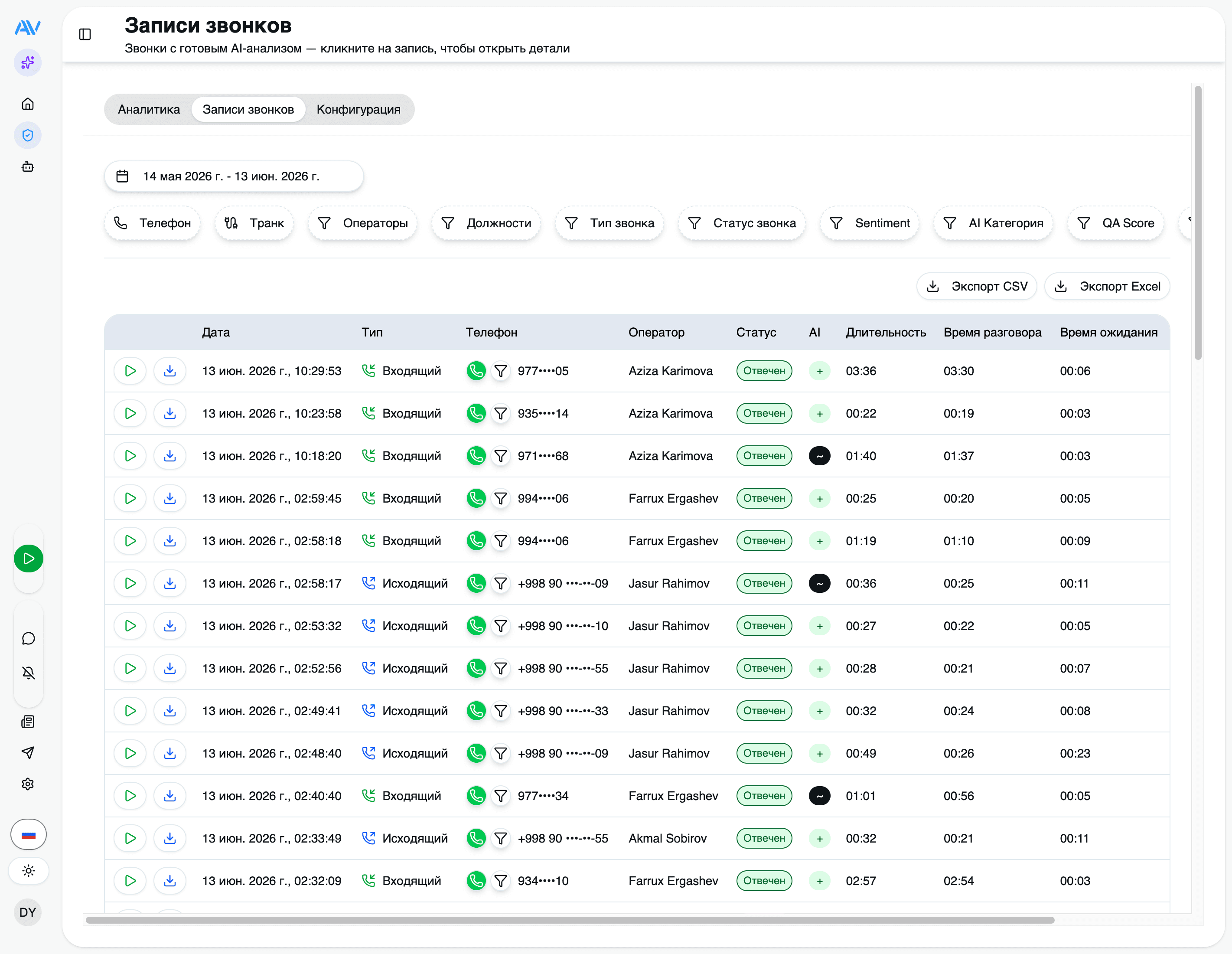
Open Calls from the sidebar to see every call, newest first. Each row is one CDR record pulled straight from your PBX.
| Column | What it shows |
|---|---|
| Date / Time | When the call started (your tenant timezone — Asia/Tashkent by default; stored as UTC) |
| Caller | The originating number |
| Called | The destination number |
| DID / Trunk | The line or DID the call came in on or went out through |
| Operator | The agent who handled the call |
| Type | Incoming or outgoing |
| Status | Call disposition (see below) |
| Wait time | Seconds before the call was answered |
| Talk time | Length of the actual conversation |
| Duration | Total call length, including ring, wait, and talk |
Statuses
The status reflects the call's disposition as reported by Asterisk.
| Status | Meaning |
|---|---|
| Answered | Connected and handled by an operator |
| No answer | Rang but was never picked up |
| Busy | The line was busy |
| Failed | The call could not be connected |
| Cancelled | The caller hung up before it was answered |
Filtering
Combine filters to narrow the table to exactly the calls you care about. Filters stack — each one you add tightens the result set.
Pick a date range to scope the table to a specific day, week, or custom window. Most other views (reports, QA analytics) follow the same range convention.
Export to Excel or CSV
Anything you can filter, you can export. Apply your filters first, then export — the file contains all matching records, not just the page on screen.
Filter to the calls you want
Set the date range and any operator, type, status, number, DID, or position filters. The export mirrors whatever the table currently shows.
Choose Export → Excel or CSV
Excel (.xlsx) is best for pivot tables and sharing with colleagues; CSV is
best for feeding another tool or script.
Download the file
The export is generated from the replicated CDR store, so it reflects the same data you see in the dashboards.
Per Astervis policy, numeric widgets and exports never print currency symbols or codes — values are plain numbers, so you can apply your own formatting downstream.
The call detail view
Click any row to open the call. The top of the view gives you the call's facts — direction, numbers, operator, timing — and the recording. Below that, if AI analysis has run, sits the AI panel.
Recording playback
If recording is enabled on your PBX, you can play the audio right in the browser — scrub, pause, and replay without leaving the page.
Recordings live on your server. Astervis reads them read-only from the PBX
(typically /var/spool/asterisk/monitor) and serves playback — it does not keep a
second copy. If a recording has been rotated off disk on the PBX, playback (and any
future AI analysis of that call) is no longer possible.
The AI panel
When AI is on, the recording is analysed by a single multimodal Gemini call (on Google Vertex AI) that produces everything below at once. Each call's results are stored alongside the CDR record and shown here.
If a call hasn't been analysed yet, you'll see its status instead:
pending → processing → completed. Rate-limited jobs back off and retry on their own,
so a busy minute resolves itself without intervention.
How recordings relate to AI
The relationship is simple and worth keeping straight:
The call is logged
Astervis replicates the CDR from your PBX into its local TimescaleDB store. This always happens — it's the foundation of the calls table and every dashboard.
The recording is read from the PBX
If your PBX recorded the call, Astervis can play it back. The audio stays on your server.
AI analyses it (only if AI is on)
With AI enabled, a finished call that has a recording becomes eligible for analysis. The queue submits the audio to the AI gateway, and the results fill the AI panel. With AI off, you still get the full call log and recording playback — just no transcript or scoring.
AI analysis is optional and metered. Enabling it means the audio of a finished call is sent to Google Gemini for analysis; all other call data and the recording itself never leave your server. See AI & privacy for exactly what crosses the boundary.
Where to go next
Last updated on